How to Use the Google Web Filter
The Google Web filter switches an existing search to a list focused on webpage links. Pick Web from the row of filters under the Google search box.
On this page
See real examples of the All and Web views
Compare your regular results for why do leaves change color with our Google Web filter screenshot. In that example, a link to the Smithsonian is first. Google can change the order for the same query.
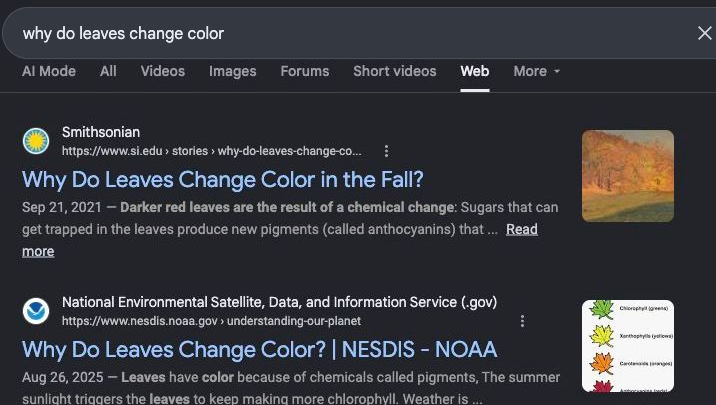
Apply the Google Web filter to an existing search
- Search for something on Google.
- Find the row near All and Images.
- Select Web for the Google Web filter. On desktop it may sit under More. On a phone swipe across the row.
Try it with why do leaves change color. The Google Web filter keeps the search terms visible so you can refine them in the same tab.
When the Google Web filter helps
Use the Google Web filter when you want to open and compare original pages. For a product manual, add the model number. For a scientific claim, try an institution name or a site: search. In each case, check the date and publisher of the individual results before relying on them.
What changes on the results page?
The Google Web filter can change the mix and order of the results. If an answer in Maps, an image thumbnail or a shopping panel would be useful, choose the corresponding filter or reopen All.
Keep the standard results in Chrome
The desktop Chrome extension is useful when you want to keep Google’s All view and hide its supported AI panels.
Leave the Google Web filter
Select All to return to the regular view. You can also press Back if applying the filter created the last history entry. Google can show different filter choices for different queries, devices and sessions. See Google’s AI Overview guidance and its search filter instructions.
Compare the Google Web filter with All before relying on a result
Keep two tabs open for why do leaves change color. In the first use All, and in the second select the Google Web filter. Check three things: whether the search field keeps your original words, whether Web is selected and whether each result goes to an outside webpage. A different order of links between the two tabs is expected.
Try the Google Web filter for a source you already know
Search for site:si.edu leaf color and select the Google Web filter. The site operator narrows the query to the Smithsonian while Web controls the type of results you see. If you need a picture of the leaf itself, use the Images filter separately. You can keep the Web tab open for the explanation and refer back to the original source.
Keep a recurring search in the Google Web filter
After you’ve checked that Web is selected, bookmark that results page. The bookmark saves that query’s URL. Use the search box to start fresh when the wording changes. If a shortcut or bookmark opens All, compare its URL with the one you saved from Web.