How to Remove People Also Ask from Google
You can remove People Also Ask from your results. Use a targeted browser filter to keep Google’s usual results, or choose Google’s free Web view when you only need links. These methods leave your Google account unchanged.
On this page
Remove People Also Ask in desktop Chrome
The questions box is separate from AI Overview. Some answers inside it may use AI; hiding the box does not replace them with human-written answers.
Get Rid of AI Overview is our Google Search extension. Free hides supported AI Overview and AI Mode elements. To remove People Also Ask as a whole section, use its Pro filter during the seven-day trial or with a subscription.
- Install the official Chrome extension and refresh Google results tabs opened before installation.
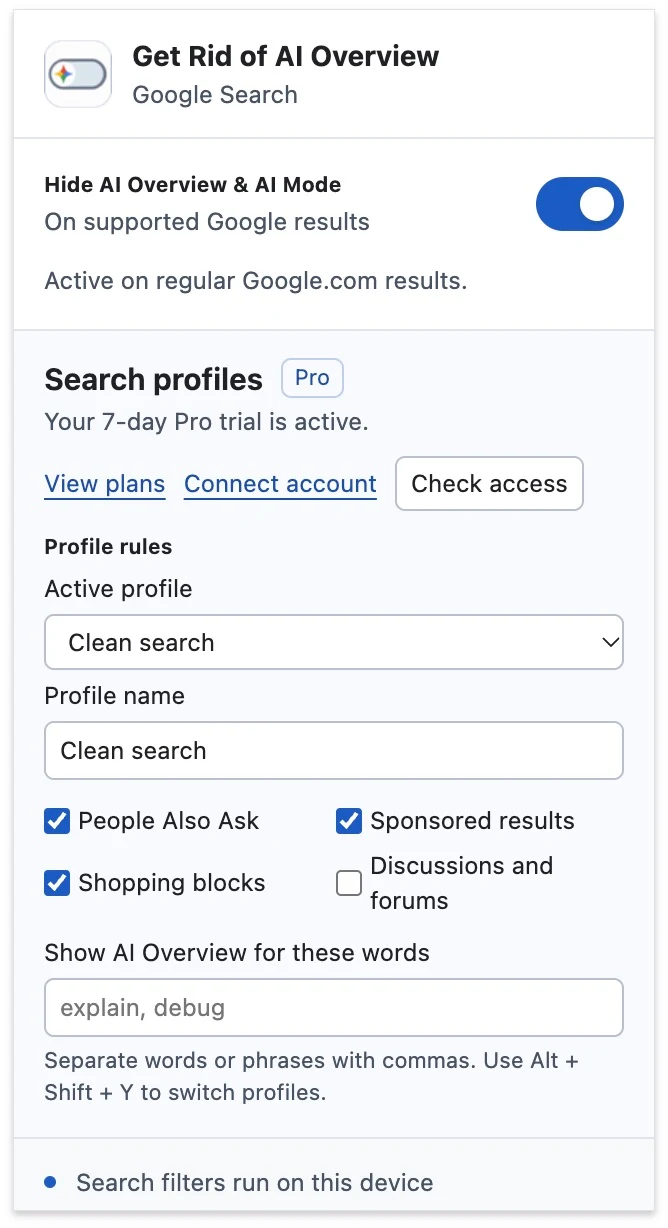
- Open the toolbar popup. Leave Hide AI Overview & AI Mode on.
- Under Search profiles, choose your active profile and check People Also Ask.
- Leave Sponsored results, Shopping blocks and Discussions and forums unchecked if you want those sections to stay.
Open a regular Google.com All results page that contains the questions box. Check that the box disappears while ordinary links still open. To remove People Also Ask on later searches, keep that profile selected.
Remove People Also Ask with Google’s Web filter
For a free way to remove People Also Ask without installing software, search Google and select Web below the search field. Look under More if it is hidden. You can also use our Web search form.
This switches to a links-focused view. It also leaves out AI Overviews and rich modules such as image rows and map cards. Choose All to restore the usual layout. Google explains the Web filter; it is not a guarantee that every advertising placement disappears.
Remove People Also Ask on iPhone Safari
Use the same Web filter to remove People Also Ask for one search on an iPhone or iPad. Our desktop Chrome extension does not run in iPhone Safari or inside the Google app.
Safari offers Hide Distracting Items on iOS 18 or later. Open the Page Menu, select that control, choose the questions box, then tap it again to hide it and choose Done. Apple warns that frequently changing items may return. Treat this as a temporary page adjustment, not an automatic filter for every search. Our Safari guide covers repeat searches.
Remove People Also Ask with a content blocker
If you already use a content blocker, its element picker may let you remove People Also Ask by selecting the surrounding box. Check the rule on another query. Undo the rule if it also hides normal results.
Use instructions for your installed browser and blocker version. uBlock Origin and uBlock Origin Lite have different capabilities; older tutorials are not interchangeable with the current releases. Consult the maintainer’s current Lite FAQ rather than assuming an old selector still works.
How to remove People Also Ask and restore it later
To undo the extension setting, uncheck People Also Ask in the active profile. The toolbar’s main switch pauses filtering when you want the original page back. Save a second profile if you often alternate between reading questions and hiding them.
A keyword exception changes whether AI Overview is allowed. It does not choose individual PAA answers to keep. If you remove People Also Ask and later want one of its questions, restore the section rather than expecting replacement answers.
Check ordinary results when you remove People Also Ask
Compare the same query before and after filtering. Confirm the search words stayed the same, ordinary links remain clickable, and no empty questions container remains. If a layout changes, pause the extension and send support your browser version and a non-sensitive example.
A page without PAA in either state cannot prove a filter works. Google varies its modules between searches. Test a query where the box is visible before you remove People Also Ask, and keep other search-changing extensions paused while comparing.
Questions before you remove People Also Ask
Can I remove People Also Ask for free?
Yes. Google’s Web filter is free. Our targeted PAA filter has a seven-day, no-card trial; it requires Pro afterward. Pro costs $3.99 monthly or $24 annually.
Can I remove People Also Ask without hiding AI Overview?
Our main switch controls AI hiding and enables the profile filters. A keyword exception can allow AI Overview for selected searches while the PAA filter remains on.
Does this remove People Also Ask permanently?
It keeps the browser rule between searches where supported. It does not change Google’s servers, and Google layout updates can affect matching.
Can I remove People Also Ask in the Google app?
Our extension cannot filter inside that app. Open Google in your browser and use Web instead.
What happens after I remove People Also Ask in the Pro trial?
Pro filtering stops and Free AI hiding remains available. Your saved settings stay in the browser. No payment details means no automatic trial charge.
If I remove People Also Ask, are my searches sent to your website?
No. Extension filtering happens in your browser; it does not send search words or result links to our servers. Searches themselves still go to Google.