What Is AI Overview in Google Search?
What is AI Overview? It is an AI-generated summary within Google Search that can combine information from several sources. It appears alongside search results when Google offers one for your query.
On this page
What is AI Overview showing on your screen?
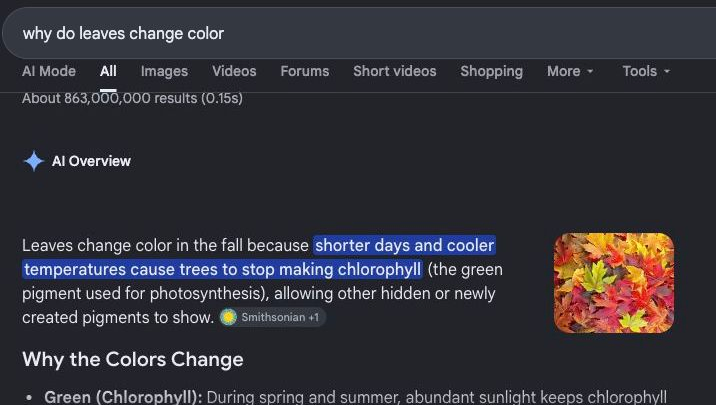
Look for the AI Overview heading above a generated answer. It can contain paragraphs, lists and source links. Google decides when it appears, so layouts vary between searches.
What is AI Overview compared with an ordinary result?
A normal result points to a particular page and shows a title and snippet. The generated summary composes an answer across information Google finds. Open the cited pages for context, dates and detail.
What is AI Overview using as its sources?
Expand the linked sources and check the exact statement you want to verify. Read the original context, prerequisites and warnings before following shortened instructions.
What is AI Overview’s accuracy limit?
Generated answers can contain mistakes or omit context. Google provides feedback controls for problematic responses. A polished summary does not establish that a statement is correct. For decisions with serious consequences, consult an appropriate qualified source and inspect the original material rather than relying on the summary alone.
Google’s AI Overview help describes the feature and its Web filter.
What is AI Overview versus AI Mode?
The overview is a module inside regular Google results. AI Mode is a separate conversational search experience with follow-up questions. Opening a follow-up can move you into a different screen. Return to All if you want the familiar result list, then decide which modules you want to see.
What is AI Overview versus People Also Ask?
People Also Ask is a box of related questions. Expanding a question can reveal an answer and a source; some answers may use AI. Hiding the overview does not necessarily remove that questions box. Our feature comparison helps identify which screen you are using.
What is AI Overview’s off switch?
Google’s Web filter is the simple route to a links-focused view. Search normally, choose Web below the search field, and look under More if necessary. You can start through our Google Web search form. Choose All to restore Google’s regular view afterward.
Web also changes the mix of result modules. If you want to keep normal cards and image rows, our desktop Chrome extension hides supported AI Overview and AI Mode elements within All instead. Its toolbar switch pauses filtering. It does not change Google’s servers or remove the feature for everyone.
What is AI Overview on a phone or another browser?
On iPhone, iPad or Android, use Web in the browser. Our extension cannot filter the Google app. See the Safari guide or the Android guide for controls on those screens.
Browser and search engine are different choices. Our extension targets Google.com, including Google opened in supported Edge. It does not filter Bing Copilot, Brave Search or Gemini.
Questions about what is AI Overview
What is AI Overview doing to my original query?
It adds a generated response to the results Google returns. If you use our extension, the query stays the same while supported elements are hidden locally.
What is AI Overview when no summary appears?
Google does not show a summary for every search. A page without one is not evidence that a blocker worked. Compare a query where the module is visible before filtering.
What is AI Overview’s cost to hide?
Our basic AI hiding and the Web search form are free. Optional Pro filters remove other sections. Compare Free and Pro plans before choosing a subscription.
What is AI Overview after I pause the extension?
Google can display its supported AI elements again. If you are in Web, select All as well; otherwise the view itself still excludes the summary.